Send Origami the message. It saves the plan.
Forward a school email, a WhatsApp message, a PDF or a photo. Origami picks out the date, time and place and saves the plan for you.

For iPhone. New subscribers get 7 days free, then $6.99 a month. Cancel anytime.

How you send it
Use the apps you already have. Pick whichever is easiest. You can also open Origami and take a photo, scan a letter or record a voice note.

From WhatsApp
- Connect WhatsApp once in Origami. It takes one tap and one message.
- Then forward a text, photo or voice note to Origami, like you would to a friend. For a PDF, use the Share button.
Only the messages you forward reach Origami. Your other chats stay on your phone.


From email
- Origami gives you your own email address. Find it in Origami’s Settings and tap Copy.
- Forward the school email to that address.

Photos, screenshots and PDFs
- Tap the Share button in Photos, Files or any app.
- Pick Origami, then open Origami to finish.

What happens next
- Origami picks out the date, time, place and what to bring.
- If something important is unclear, it asks you.
- The plan is saved in Origami with the original message attached. You can change anything.
Your plans are saved in the Origami app. Origami doesn’t change your Apple or Google Calendar.
What you get back.
Each message becomes a plan with the date, time, place and what to bring. When something changes, send the new message and the plan is updated.
Send it as it is.

A message, email, PDF, photo or voice note.
Date, time and place, saved.
It keeps details you shared before.

You mentioned Dr. Avery once. You can see and change what Origami keeps.
When something changes,
send the update.
“Tuesday’s swim moves to 5:15. Same pool.”

Origami picks out who, what, when and where.
Send a voice note to update the dentist appointment.
Voice note0:07 “Oh and Maya’sWho dentistWhat moved to Thursday at three fortyWhen, it’s at Dr Okafor’s officeWhere now.”
Saved in Origami
Dentist, Dr Okafor · Maya Thu, Jun 183:40 PMDr Okafor's officeMoved from Tuesday
Send a photo of the invitation. Origami picks out the time and place.
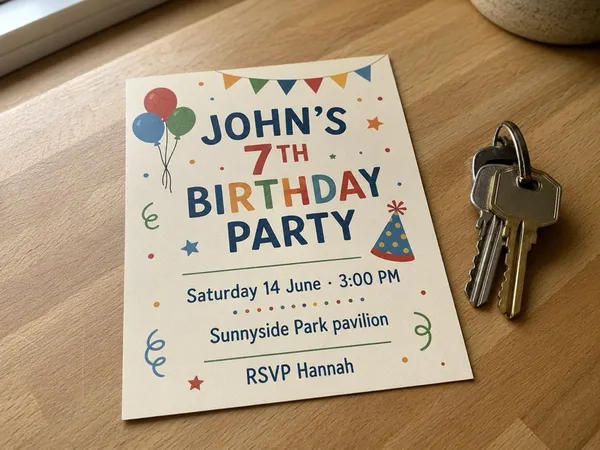
John’sWho 7th birthday partyWhat, Saturday, June 14, 3:00 PMWhen, Sunnyside Park pavilionWhere.
Saved in Origami
John's birthday party Sat, Jun 143:00 PMSunnyside Park pavilionOriginal invitation attached
Share the season schedule. Origami saves each game inside it.
 School PDFIronworks Youth Soccer · Season schedule.pdfpage 2 of 4
…confirming that the Under-10sWho will play their league gameWhat against the Kestrels on Friday, June 26When at 7:00 PMWhen on field 3Where. Please arrive fifteen minutes early; the away team wears the darker jerseys…
Saved in Origami
Soccer vs the Kestrels Fri, Jun 267:00 PMIronworks, field 3Arrive 15 minutes early.

Every practice, party and pickup, in order.
Origami puts each plan in time order for the day. When a time changes, send the new message and the plan is updated.

Free for 7 days. Then $6.99 a month.
- For iPhone. Sign in with your Apple ID.
- Every saved plan keeps the message it came from.
- Cancel anytime in your iPhone Settings. On your first free trial, cancel at least 24 hours before it ends and you pay nothing.
After you download
- Open Origami and sign in with Apple.
- Start your 7-day free trial.
- Send your first school email or WhatsApp message.
Questions parents ask
How do I get started?
- Download Origami on your iPhone.
- Sign in with Apple.
- Start your 7-day free trial.
- Send Origami your first school email, WhatsApp message, PDF or photo.
Is my data private?
Origami only sees what you choose to send it. It does not read your inbox or your other chats. The Privacy Policy explains what is stored, who processes it, and how to delete your account and data. Read the full Privacy Policy
What does it cost, and can I cancel?
New subscribers get 7 days free, then $6.99 a month. Cancel anytime. It renews every month. To cancel, open Settings on your iPhone, tap your name, then Subscriptions. If this is your first free trial, cancel at least 24 hours before it ends and you pay nothing.
What can I send to Origami?
School emails, WhatsApp messages, PDFs, photos and screenshots. You can also take a photo, scan a letter or record a voice note inside Origami.
How do I send a WhatsApp message to Origami?
Connect WhatsApp once in Origami: tap Connect WhatsApp and send the message WhatsApp fills in. After that, forward a text, photo or voice note to Origami in WhatsApp, like you would to a friend. For a PDF, use the Share button.
How do I send an email to Origami?
Origami gives you your own email address. Find it in Origami’s Settings, tap Copy, and forward the school email to it.
Does everyone in the group chat need Origami?
No. You forward the message to your own Origami. The people who sent it do not need to sign up.
Does it add plans to my Apple or Google Calendar?
No. Your plans are saved in the Origami app, where you can see your day, change a plan, or open the original message.
What happens when a time changes?
Send the new message. Origami updates the plan, and asks you if it can’t tell which plan you mean.
How does it know the dentist’s address?
Origami keeps useful details you’ve shared before, like your dentist’s name and address, so you don’t have to repeat them. You can see and change those details in the app.
What if it gets a detail wrong?
Origami uses AI and can get a detail wrong. It asks you when an important detail is unclear. Every plan keeps the original message, and you can change or delete it.
Is Origami on Android?
Not yet. Origami is an iPhone app for now.
What currency is the price in?
Prices on this site are in US dollars. The App Store shows your local price before you subscribe.

Try it with the next school email.
Try it free on iPhoneFor iPhone. New subscribers get 7 days free, then $6.99 a month. Cancel anytime.